Tracking High-Value Equipment with LoRa
At school, expensive cases containing specialized lab sets are regularly loaned out to students. Managing them brings up a few practical questions: how do we know when a case is checked out, whether it is still on school grounds or potentially stolen, and roughly where it is?
Traditional trackers often rely on GPS and cellular/4G, but monthly SIM card subscriptions per case quickly add up. That’s why I researched whether we could solve this with a Proof of Concept based on Meshcore, an open-source mesh framework that communicates over LoRa.
The Hardware Setup
For this project, I had two Heltec WiFi LoRa 32 V4 boards and an Orange Pi:
- The Sender (in the case): A Heltec V4 with a 3000mAh LiPo battery. Runs custom C++ firmware that handles power management, sensor measurements, and packet transmissions.
- The Receiver (gateway): A second Heltec V4 stationed at school, configured on a private LoRa channel. It continuously listens for incoming packets and forwards them over USB serial to the Orange Pi.
- Backend & Database (Orange Pi): A Python service running in Docker that reads the serial packets, decodes the encrypted data, and saves everything to an SQLite database.
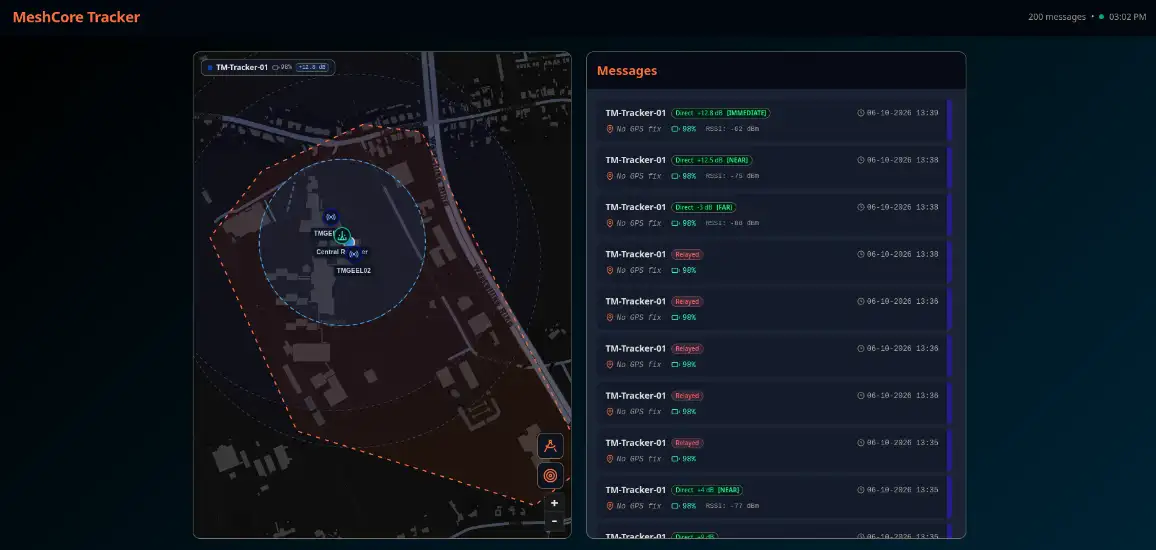
- Dashboard (SvelteKit): A web interface that clearly displays real-time status, battery levels, locations, and proximity estimates of the cases.
Battery Life & Custom Firmware
A case can sit unused in a classroom or storage locker for weeks at a time. The transmitter therefore needed to draw as little power as possible.
Restricting Quiescent Current
By default, an ESP32-S3 development board draws far too much power due to active peripheral chips. In the sender firmware, I explicitly power down the GPS module and LoRa radio before deep sleep, isolate unused GPIO pins, and turn off the on-board OLED display. This brought deep sleep power draw down to 20-40µA, allowing the 3000mAh battery to last for months.
The GPS “Streak” Method
Continuously searching for GPS satellites drains a battery in just a few hours. To prevent this, I maintained a persistent fail-counter in RTC memory:
- Quick Pre-Check (10s): Upon waking, the board checks for 10 seconds whether any satellites are visible at all.
- Abort Immediately on No Signal: If none are detected, it aborts right away, transmits a lightweight “Alive” packet (coordinates 0,0 + battery voltage), and returns to sleep immediately.
- Full Satellite Search (60s): Only on a cold boot or after every 10th consecutive failed pre-check does it attempt a full 60-second satellite acquisition.
Protocol v1: Everything in 11 Bytes
To minimize Time on Air and battery consumption, all critical telemetry is compressed into an 11-byte (88-bit) binary bitfield:
| Field | Size | Description |
|---|---|---|
| Year | 7 bits | Offset starting from 2026 (0-127) |
| Day of Year | 9 bits | Day number of the year (0-365) |
| Minute of Day | 11 bits | Time of day in minutes (0-1439) |
| Battery | 8 bits | Voltage scaled from 0 to 4.2V |
| Latitude (Lat) | 21 bits | Bit-compressed coordinate float |
| Longitude (Lon) | 22 bits | Bit-compressed coordinate float |
A device ID is not needed in the payload because Meshcore handles addressing natively. Within Meshcore, this packet is encrypted with AES-256 and protected by a CRC16 checksum (resulting in a total of 22 bytes over the air).
Why GPS Doesn’t Work Indoors
Outdoors GPS worked (mostly), but in practice these cases spend over 90% of their time indoors: in classrooms, laboratories, or metal lockers.
GPS requires a direct line of sight to the sky. Thick concrete and steel reinforcements completely block satellite signals, resulting in a 0% fix rate. Continuously searching for satellites indoors is pointless and only wastes battery.
Determining Location with SNR & RSSI
If GPS doesn’t work indoors, how do you locate a case? To solve this, I investigated using the RF signal metrics measured by the LoRa receiver: RSSI (signal strength) and SNR (signal-to-noise ratio).
The Physical Reality of RSSI and SNR
- RSSI measures signal power (in dBm): The closer the transmitter, the stronger the signal. But indoors, walls and reflections cause multipath fading. At 869 MHz, the wavelength is roughly 34 cm. Moving the board just 17 cm can cause destructive interference that swings the RSSI by 10 to 15 dBm without any actual distance change! Converting RSSI directly into exact meters indoors simply does not work.
- SNR measures signal quality (in dB): At short to medium range, SNR stays clamped at its maximum (+10 to +14 dB). It only drops when the signal becomes very weak near the noise floor. You cannot use SNR to measure distance, but it works great as a quality filter: if SNR < 0 dB, the signal is heavily distorted and the RSSI cannot be trusted.
First Hop & School Repeaters
A crucial insight when using a LoRa mesh is how a packet arrives:
- Direct reception (0 hops): The signal arrives directly from the case at our central receiver. In this scenario, the measured RSSI and SNR genuinely reflect how close the case is to that receiver.
- Via a repeater (> 0 hops): If a message arrives via a school repeater, our
receiver measures the signal strength of the repeater, not the case. The
original RSSI from the case is lost over the air. The backend sets RF metrics
to
Nonein this scenario to prevent false distance calculations. - Locating via repeaters: Because the school has fixed repeaters installed and we can detect which node picked up the message first (the first hop), we still know exactly which building or wing the case is in.
This allows us to accurately assess when a case is on school grounds, as long as it doesn’t disappear deep into a basement where LoRa cannot penetrate.
Protocol v3 & Pairing Serial Logs
Extracting this data from the Heltec receiver required two technical steps:
- Forcing Protocol v3: By default, Meshcore’s companion firmware does not
send SNR (protocol v0). The Python backend sends a
CMD_DEVICE_QUERYcommand over serial at startup to promote the receiver to protocol v3, unlocking SNR reporting with 0.25 dB resolution. - Asynchronous RSSI Pairing: RSSI is not included inside the encrypted
channel frame, but arrives in separate
RX_LOG_DATAframes. The backend pairs these two data streams by matching identical SNR values within a time window of at most 500 milliseconds.
Stable Zones Instead of False Meters
Because exact meter calculations are unreliable indoors, the backend uses a rolling median of 5 samples and categorizes positions into practical zones:
- 🟢 Immediate (≥ -65 dBm): Case is in the same room as the receiver (< 5 meters).
- 🟡 Near (-65 to -85 dBm): In the same hallway or wing (~5-25 meters).
- 🟠 Far (-85 to -105 dBm): Further in the building (~25-80 meters).
- ⚪ Fringe (< -105 dBm): Edge of coverage.
Web Dashboard
The SvelteKit dashboard brings everything together:
- Real-Time Message List: Shows incoming packets, battery levels, last-seen timestamps, and the reception route (Direct, Building repeater, or Relayed).
- Proximity Indicators: Uses the filtered zones to give immediate insight into roughly where a case is located.
- Map View: Whenever a case is outdoors and acquires a GPS fix, its coordinates are automatically plotted on an interactive map.
Technology Stack
- Hardware: Heltec WiFi LoRa 32 V4, Orange Pi
- Firmware: C++, PlatformIO, ESP-IDF Deep Sleep
- Network & Protocol: Meshcore
- Gateway & Backend: Python, SQLite, Docker & Docker Compose
- Frontend: SvelteKit, TypeScript, Tailwind CSS